
Closed captions (CC) are words on a screen that show what you hear. They include dialogue, sound effects, music cues and speaker names. You can turn them on or off.
This guide explains the closed meaning, how closed captioning works, the benefits, USA rules and real examples. It also shows how to switch captions on.
Table of Contents
What Are Closed Captions? Meaning and How They Work
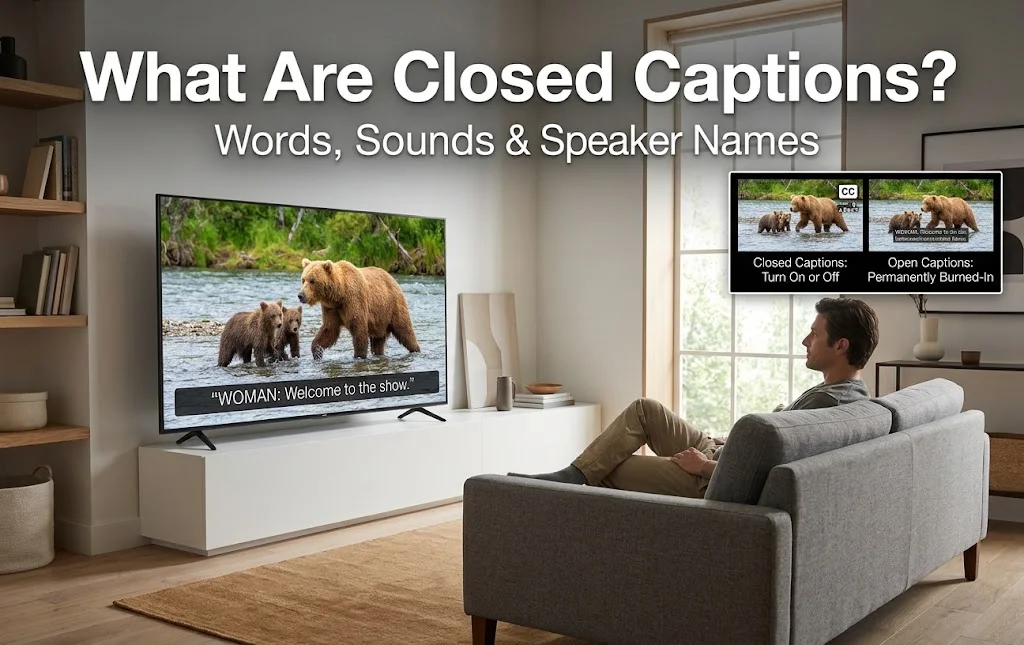
Closed turn sound into text. They help people follow a video when they cannot hear it well, or at all.
What does closed mean? The word “closed” means the text stays hidden until a viewer turns it on. Captions show speech and also non-speech sounds, like a door slam or a phone buzz. They often name the speaker too.
What is the difference between open and closed? Open captions are burned into the video. Nobody can turn them off. this sit in a separate track, so viewers can switch them on, off or change their look.
What is the difference between this captions and subtitles? In the USA, captions and subtitles are not the same thing. Captions show dialogue plus sounds, mainly for Deaf and hard of hearing viewers. Subtitles assume you can hear but may not know the language, so they mostly show speech or a translation. Many streaming apps use the label SDH (subtitles for the deaf and hard of hearing) for caption-style text. The UK and many other countries use “subtitles” for both.
How do we work on this? There are two main ways to make them:
- Pre-recorded captioning: A captioner types the text, times it and checks it before the video airs.
- Live captioning: A trained stenographer or a respeaker types or repeats speech as it happens. Some systems use speech recognition and AI. Live captions often lag by a few seconds.
Captions also show up in two styles. Pop-on captions appear as a full block of text. Roll-up captions scroll line by line, which suits live news and sports.
Behind the scenes, old analog TV carried captions on Line 21 using the EIA-608 standard. Digital TV uses CEA-708, which allows more fonts, colors and languages. Online, creators often upload caption files such as SRT.
When were closed captions invented? Closed captioning was first shown in the USA in December 1971. PBS and WGBH helped test it. Regular captioned shows began on American TV on March 16, 1980. The National Captioning Institute (NCI) was set up in 1979 to work with the TV networks. You can read more in this overview of closed captioning.
Closed captions make videos more accessible by helping viewers follow dialogue, sounds, and important moments on screen. If you enjoy exploring how audiovisual content connects people, history, and culture, discover these World Audiovisual Heritage Day captions for Instagram to celebrate the power of films, recordings, and visual storytelling.
Benefits of Closed Captions and USA Laws

Captions help far more people than most viewers expect. They also come with real legal rules in the USA.
Who benefits from this captions? Millions of people do. A 2016 national survey from Oregon State University Ecampus found that 70.8% of students with no hearing difficulty used captions at least some of the time. They said captions helped them focus, remember facts and handle poor audio. In the UK, about 6 million of the 7.5 million people who use TV subtitles have no hearing loss, according to Ofcom.
Here are the main benefits:
- Accessibility: Captions give equal access to people who are Deaf or hard of hearing.
- Noisy places: You can follow a show in a gym, airport, bar or on a train.
- Quiet places: You can watch late at night or in an office without sound.
- Language learning: Reading along helps ESL learners link words to speech.
- Better focus: Text backs up the audio, which helps with accents, mumbling and fast talkers.
- Searchable video: Caption text can be read by search engines, so it supports video SEO.
- More reach for creators: Many people scroll social media with the sound off, so captions keep them watching.
Are this captions required by law in the USA? In many cases, yes. Here are the key rules:
- Television Decoder Circuitry Act (1990): It required TVs with screens 13 inches or larger to include a caption decoder by July 1, 1993.
- Americans with Disabilities Act (ADA): It bans disability discrimination. Title III covers public places such as hospitals, museums and shopping centers. Learn more at ADA.gov.
- FCC rules: The Federal Communications Commission requires captions on most TV programs in English and Spanish, with some exceptions. See the FCC closed captioning guide.
- FCC quality standards (2014): Captions must be accurate, well timed, complete and placed so they do not block key visuals.
- 21st Century Communications and Video Accessibility Act (2010): It extended caption rules to TV shows that return online.
- Local rules: Some cities, including Boston and Portland, require captions to be on for public TVs. New York City requires movie theaters to offer captions for up to four showtimes per movie each week.
- Web standards: WCAG Success Criterion 1.2.2 calls for captions on nearly all prerecorded video with sound.
Can I trust auto-generated captions? Not fully. Automatic captions are a good first draft, but studies often put their accuracy near 60–70%. Background noise, music, accents and slang make mistakes worse. Always read and fix them before you publish. Poor captions can also lead to complaints and lawsuits.
What makes good closed? Quality captions follow five rules:
- They are accurate and spelled correctly.
- They are synchronized with the audio.
- They are complete, with sounds and speaker names.
- They are consistent in style.
- They are readable, with enough time on screen. Pros often keep reading speed between 180 and 300 words per minute.
Closed captions make videos more accessible by displaying spoken dialogue, sound effects, and other audio cues on screen. If you’re creating travel videos for your next adventure, pair them with engaging Europe trip captions for Instagram to share your favorite destinations, unforgettable moments, and wanderlust-filled experiences with your audience.
Closed Captions Examples and How to Turn Them On
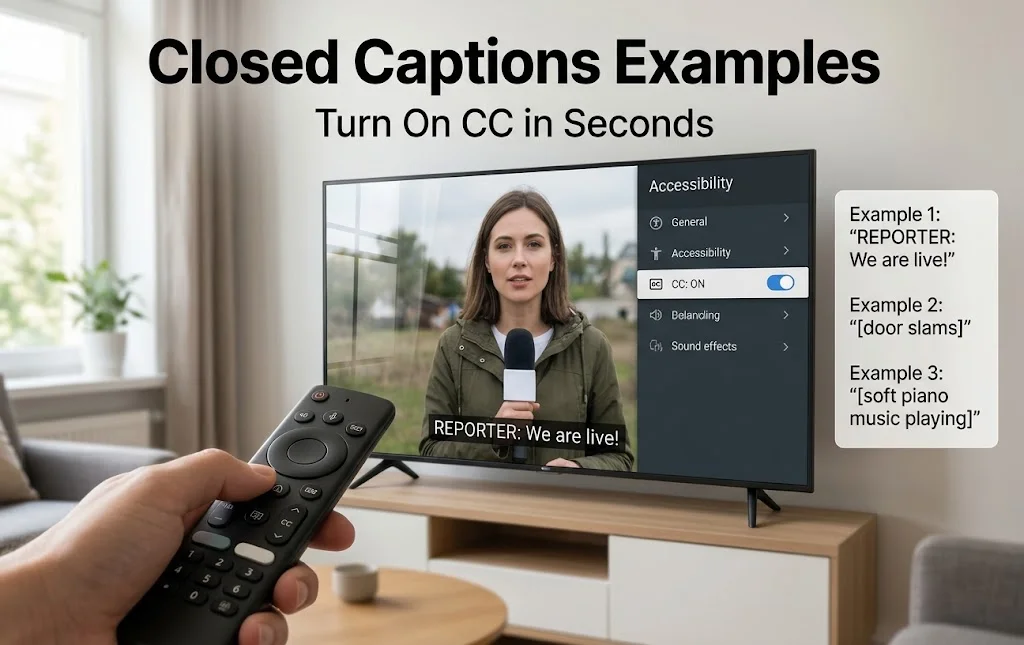
Seeing real this captions examples makes the idea clear. After that, switching them on takes under a minute.
What do closed look like? They usually sit at the bottom of the screen in white text on a dark box. Styles vary by company. These samples show common patterns.
Dialogue with a speaker label:
MAN: I got the machine ready.
Sound effect in brackets:
[engine starting]
Speaker change in live TV:
>> Reporter: We are live outside the stadium.
Music cue:
[soft piano music playing]
Off-screen voice with tone:
(woman, whispering) Did you hear that?
Song lyrics, often shown with a music note:
♪ Singing along to the radio ♪
A weak caption versus a strong one:
Weak: He said ok and left.
Strong: JAKE: Okay. [door slams]
Where do you see closed captions? You will find them on live and cable TV, streaming apps, YouTube, social media, DVDs and Blu-ray discs. They also appear in video calls on Zoom and Google Meet, in video games, in movie theaters and in stadiums. Captioned phones show live text for calls.
How do I turn on closed? The steps depend on your device, but they are quick:
- TV with remote: Press the CC or Settings button. Then pick Accessibility, then Captions, and turn them on.
- Streaming apps (Netflix, Hulu, Disney+, YouTube): Start a video, tap the speech bubble or CC icon, and choose English or another language.
- iPhone: Open Settings, tap Accessibility, then Subtitles & Captioning, and turn on Closed Captions + SDH.
- Android: Open Settings, tap Accessibility, then Caption preferences, and switch captions on.
- Zoom or Google Meet: Select the CC or Show Captions button in the meeting toolbar.
How do I change caption size and color? Most phones, smart TVs and apps let you pick font, size, color and background. A bigger font with strong contrast is easier to read.
How can creators make better captions?
- Start with auto-captions, then fix every error.
- Keep lines short, ideally two lines at a time.
- Add sound cues that matter to the story.
- Name speakers when the voice is off-screen.
- Do not cover on-screen text or faces.
- Test on a phone before you publish.
What mistakes should you avoid? Skipping sound effects, using bad timing, mixing styles and leaving out speaker names are common slips. Each one makes a video harder to follow.
FAQs
What are closed captions in simple words?
Closed captions are text on a screen that show spoken words, sound effects and music. Viewers can turn them on or off. They help people watch with no sound or with hearing loss.
What is the difference between closed and subtitles?
In the USA, closed captions show dialogue plus sounds and speaker names, mainly for Deaf and hard of hearing viewers. Subtitles usually show speech or a translation for viewers who can hear but may not know the language.
What is the difference between open and closed?
Open captions are burned into the video and always show. this captions are a separate track that viewers can turn on or off. Many platforms also let viewers change size and color.
Are this captions required by law in the USA?
Often, yes. FCC rules require captions on most TV programs. The ADA and the 21st Century Communications and Video Accessibility Act cover many public places and online video. Rules vary by content type, so check the FCC guidance before you publish.
How do I turn on this captions on my TV or phone?
On a TV, press the CC or Settings button on the remote and choose Captions. On a phone, open the video app’s settings or the device’s Accessibility menu, then switch on Closed Captions.
Conclusion
Closed captions make video clear for everyone. They support accessibility, help in noisy or quiet places and keep viewers engaged. Turn them on the next time you watch. If you publish video, add accurate captions and fix every auto-caption error. It is good for your audience and helps you meet USA rules.

Abroy Ehtisham is a dedicated website Captions Orbit author and content lead who specializes in crafting engaging, highly detailed, and insightful digital content designed to cut through online noise. Driven by a deep commitment to audience-first communication, clear narrative structuring, and thorough research, Abroy explores the evolving landscape of web culture, online media, creative strategy, and community building.